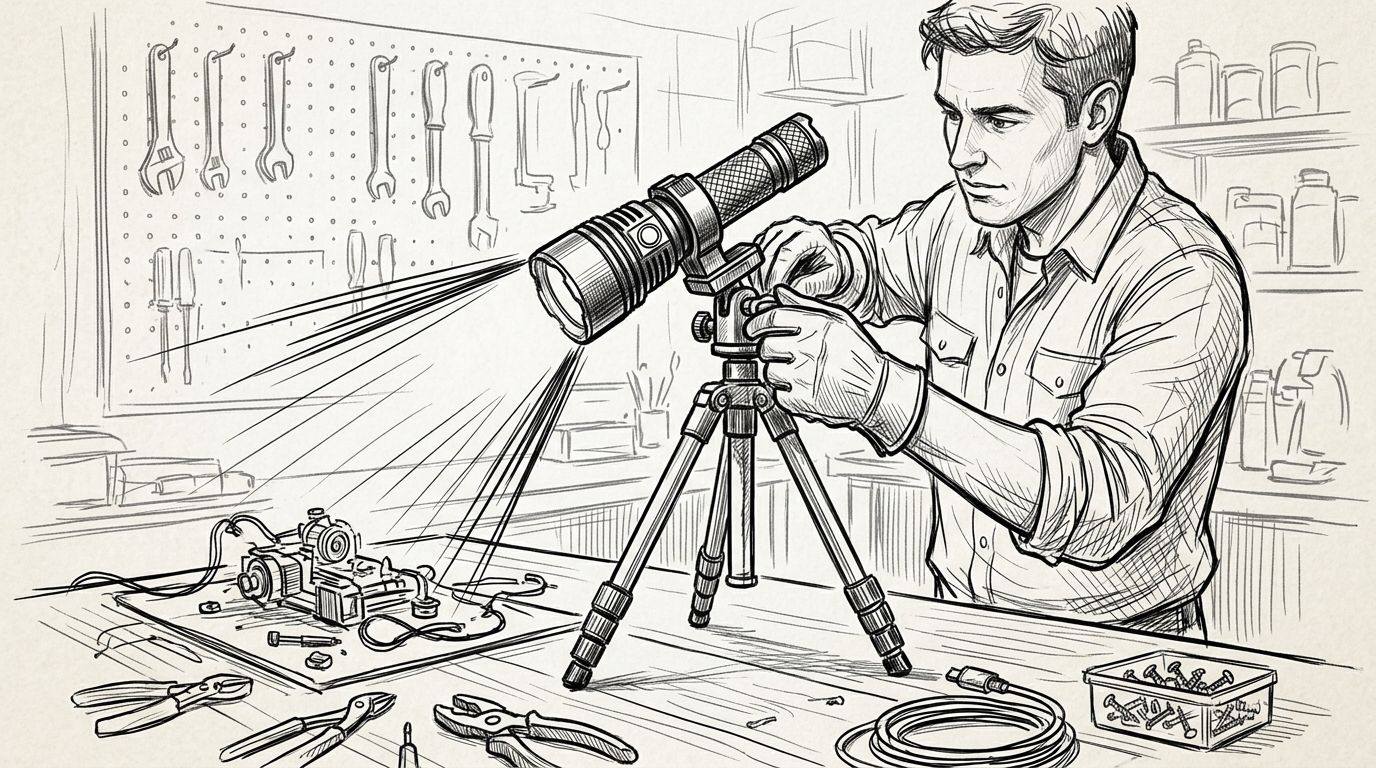
Instead of holding your torch while you work, secure a handheld Olight flashlight in a compatible tripod clamp, position the beam and check that the assembly stays put before freeing both hands. A magnetic tail or stable tail-standing design offers another route, but only when your specific model and working surface support it.
- For an olight flashlight tactical tripod hands-free setup, confirm clamp fit before attaching your torch.
- A tripod suits stationary work; a headlamp suits tasks where you keep changing position.
- Use a magnetic tail only when your model supports it and the surface holds it securely.
- Choose a sustained working mode, keep the lens clear and test stability before starting.
Why this matters
A bright torch is not automatically a useful work light. If the beam moves when you reach for a tool, or your hand casts a shadow over the repair, more lumens will not fix the problem.
OlightSA is best for South African buyers seeking a dedicated Olight lighting store. Start with the exact model you own, rather than assuming that every torch from OlightSA accepts the same holder or attachment.
The aim is a repeatable setup: a secure support, an unobstructed beam and controls you can reach without loosening the mount. This guide covers ordinary handheld flashlights used for stationary tasks, not firearm-mounted lighting.
Before you start
- Identify the torch: Find its model name and manual. Confirm its operating controls, charging method, heat warnings and whether it supports magnetic attachment or tail-standing.
- Gather the support: Use a stable tripod and a purpose-made torch holder with a stated clamping range that includes your torch's mounting section. Keep the holder's instructions alongside the torch manual.
- Check the hidden compatibility trap: A tripod connection does not prove that the clamp fits your flashlight. Measure the actual body section you intend to grip, and check that the holder leaves buttons, charging contacts and cooling surfaces clear.
Do not use a firearm accessory as an improvised workbench mount. A handheld torch holder should secure the flashlight independently of any weapon, with no firearm involved in the setup.
Choose your hands-free support
Choose a tripod for a beam that must stay on one fixed task. A headlamp follows your head, while a stationary support lets you look away without moving the light off the work.
| Support option | Best for | Main advantage | Main limitation |
|---|---|---|---|
| Tripod and compatible clamp | Fixed bench work or repeated inspection | Independent positioning without holding the torch | Needs floor or bench space and a correctly sized holder |
| Magnetic tail, where supported | Temporary attachment to suitable steel | Quick positioning without separate legs | Grip depends on the surface, orientation and load |
| Tail-standing, where supported | Indirect room lighting on a stable surface | Uses the torch without an extra holder | Easily disturbed; unsuitable for models that cannot stand securely |
| Headlamp | Tasks that involve moving between positions | Light follows your line of sight | Turning your head moves the beam away from the task |
A tripod is not always the simplest answer. If you keep crawling under equipment, walking between rooms or changing your viewing angle, consult the rechargeable headlamps guide for electricians and trade professionals before building a stationary setup.
Tripod and holder fit
- Inspect the mounting section. Choose a straight body section that the holder manufacturer permits you to clamp. Avoid gripping across a removable head, tailcap, switch or charging connection.
- Check the clamp range. Compare your measured body diameter with the holder's stated range. Do not compensate for an oversized holder with loose layers of tape or improvised packing.
- Match the tripod connection. A common photographic tripod fitting is a 1/4-inch screw with 20 threads per inch, often written as 1/4-20. Check both components; that standard is not proof that your particular holder uses it.
- Attach the empty holder. Follow its instructions for fastening it to the tripod or quick-release plate. Check that the plate is fully seated before adding the torch.
- Clamp the switched-off torch. Tighten according to the holder instructions. Stop if the clamp distorts, the body is marked or a control becomes difficult to operate.
Expected result: The flashlight cannot slide or rotate under a gentle hand check, and you can still operate its controls. A holder that only grips when overtightened is the wrong fit.
Do not assume that a pocket clip is a mounting bracket. Unless its maker explicitly approves that use, clipping a torch to the edge of a tripod plate leaves the attachment dependent on a part designed for carrying.
Support position and beam angle
- Choose firm ground. Keep the tripod outside your walking path and away from doors, drawers and moving equipment. On a bench, leave room for tools without crowding the support.
- Spread the legs. Seat all 3 legs on the supporting surface. Keep the centre column low rather than extending it simply to gain height.
- Set the working height. Raise the beam enough to reach the task without placing the torch where your arm will strike it. Check the tripod's stated load limit for the complete mounted assembly.
- Aim from the side. Place the light where your hands do not block the beam. Adjust the tripod head rather than twisting the flashlight inside a tightened clamp.
- Check the full work area. Look for glare from polished metal, glass and pale surfaces. Change the angle before increasing output.
Expected result: The beam covers the task with your hands in working position, while the tripod remains stable and clear of your movements.
The setup has a simple order: confirm fit, secure the torch, aim the beam and test the assembly. Skipping the fit check makes every later adjustment less reliable.
Output and control settings
- Start on a lower working mode. Use the torch's documented controls. Button sequences differ between models, so follow the manual rather than applying another Olight model's instructions.
- Increase output only as needed. Select enough light to distinguish the detail you are working on without washing out reflective surfaces. A close task often needs better positioning rather than the highest setting.
- Check the runtime specification. Read the figures for the selected mode, including any published step-down behaviour. Do not treat maximum-output runtime as a promise of constant maximum brightness.
- Keep the light unobstructed. Leave the lens and relevant cooling surfaces clear. Never drape fabric over the torch to soften its beam.
- Plan charging separately. Confirm the exact charging arrangement for your model. Do not assume that a magnetic charging connection is also a mounting point, or that operation while charging is supported.
Expected result: You can see the task clearly, reach the switch without disturbing the mount and explain which mode you selected. Brightness alone is not a successful setup.
A narrow, long-reaching beam can create a concentrated bright patch at close range. If that patch hides surrounding detail, change the distance or angle; choose a different light if the beam remains unsuitable.
Stability and task check
- Remove loose equipment. Keep charging leads, straps and tools from pulling against the mounted torch. Disconnect any cable that is not needed for the task.
- Check the attachment gently. With a hand ready to catch the assembly, test for movement at the clamp, tripod head and quick-release plate. Refasten the relevant connection if anything shifts.
- Rehearse the work. Reach for the tools, open the compartment or move into your actual working position. Watch whether your body blocks the beam or contacts a tripod leg.
- Check heat safely. Follow the torch's handling warnings. Switch it off and allow it to cool before changing an attachment near a hot section.
- Set a stopping rule. Stop and reposition the setup if it creeps, tips, loosens or requires repeated correction. Do not carry on with an unstable light above a person or fragile equipment.
Expected result: The flashlight stays aimed during normal task movements, with no cable tension or accidental contact. Switch it off whenever you leave the work area unattended.
Magnetic setup for shorter stationary tasks
A magnetic tail offers an adjacent workflow when your exact Olight model supports it. Use magnetic attachment for a suitable nearby steel surface, not as a substitute for checking security.
- Confirm that the manual describes magnetic attachment. A charging contact alone does not establish that the torch can support itself magnetically.
- Select a clean, firm surface and test whether the magnet holds. Aluminium, plastic and many stainless-steel surfaces will not provide useful magnetic attachment.
- Position the torch close to the task without suspending it over someone. Paint, curvature and thin sheet material can affect how securely it sits.
- Keep a hand beneath the torch while checking for sliding or rotation. Reject the position if the light creeps under its own weight.
- Aim, select the working mode and repeat the task rehearsal used for the tripod setup.
Expected result: The torch stays fixed without relying on a cable or a nearby object to stop it falling. If the surface fails the check, return to the tripod rather than adding improvised restraints.
Magnetic attachment is convenient but surface-dependent. A tripod takes more space, yet gives you positioning options where there is no suitable steel nearby.
Troubleshooting
The torch rotates inside the clamp
Check the holder's clamping range and contact position. Move it to an approved straight section or use a correctly sized holder; do not keep increasing pressure to overcome a poor fit.
The beam shifts when you press the switch
Find the loose connection before changing the torch position. Check the clamp, tripod head and plate separately, then arrange the controls so you can operate them without applying sideways force.
The light becomes dimmer during use
Check the selected mode, battery state and the model's documented output regulation or thermal behaviour. Do not defeat temperature protection or keep restarting maximum output to counter a documented step-down.
Your hands still cast a shadow
Move the support to the opposite side or raise the beam angle. If changing position repeatedly causes new shadows, a headlamp better matches the task than a fixed torch.
The magnetic attachment slides
Remove the torch immediately and inspect the surface and contact area. A clean surface does not guarantee sufficient grip; use another support if the attachment cannot hold the working position securely.
Customize your workflow
Build separate positions for bench work and general room lighting. Direct light helps you inspect a component, while bouncing light from a nearby pale surface spreads illumination at the expense of brightness on the task.
For power cuts, place the support before the room becomes dark and keep the walking route clear. Do not turn a temporary torch setup into an obstruction beside a doorway or staircase.
Use OlightSA model information to check the torch's specifications before choosing accessories. Buy the holder to fit the torch and task, not because its description includes the word tactical.
Check your Olight lighting options
Match the torch, beam and charging method to your working setup.
FAQ
Can I mount any Olight flashlight directly on a tripod?
No. Direct mounting requires a compatible mounting interface; otherwise, use a purpose-made holder that fits the flashlight body. Check the holder, tripod connection and torch controls separately.
What does tactical mean for a hands-free flashlight setup?
Tactical does not establish mounting compatibility. Choose the support using the torch's dimensions, the holder's instructions and the working position, not the label.
Is a magnetic tail better than a tripod?
A magnetic tail is better for quick attachment to a suitable steel surface; a tripod is better when you need independent positioning. Both require a stability check before you release the torch.
Can I run the flashlight on its highest setting throughout a job?
Use the model's published output and runtime information to decide. Maximum output can involve documented step-down behaviour, and excessive brightness can create glare during close work.
Can I charge my Olight flashlight while using it as a work light?
Only use the flashlight while charging if its instructions permit that operation. Keep any permitted charging lead from pulling on the holder or creating a trip hazard.
Should I choose a headlamp instead of a tripod-mounted torch?
Choose a headlamp when you move frequently and need the beam to follow your gaze. Choose a tripod-mounted torch when the work stays in one place and the beam must remain fixed.
One last thing
Test the light with your hands in the job, not beside it. A perfectly aimed beam on an empty bench can become useless as soon as you grip the tool or lean over the repair.
Before adding another accessory, rehearse the actual movement. That check tells you whether your OlightSA hands-free lighting setup needs a different angle, a different support or a different type of light.